Use the NHS App

Use the NHS App

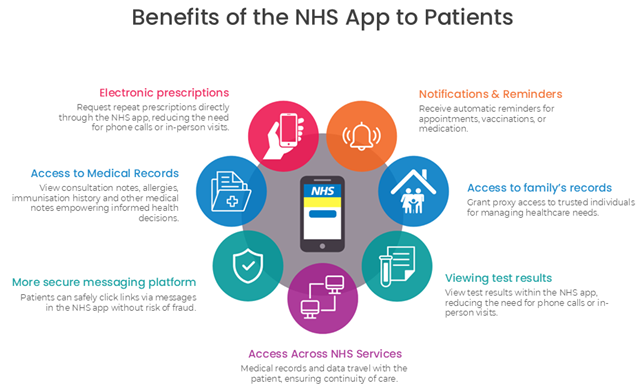
If you’re a patient at our practice you can use the NHS App, a new simple and safe way to access a range of NHS services on your phone or tablet. Find out more below

The NHS App is installed on your phone or tablet.

It allows you to access NHS services and information safely and conveniently. At any time, and from any place you need to.

Whilst some patients are confident using apps, some of us aren’t. This page will help answer some questions you may have.

Once you have access you can:

– Book appointments
– Order repeat prescriptions
– View your health records and test results
– Find NHS Services
– Use NHS 111 online
– Get reminders and messages

This is much more convenient than ringing or going into the surgery.

You must be aged 13 or over to use the NHS App.

You also need to be registered with a GP surgery in England or the Isle of Man.

Find out more about who can use the NHS App.

Search for ‘NHS App’ in your App store to download it. There will be similar apps, so ensure you choose the one by NHS Digital. Or scan the QR code below.

Your health records are private to you, so you’ll need to set up security, and prove who you are.

Your NHS App then securely connects to information from your GP surgery.

Find out how to create an NHS login

Find out how to prove who you are

The NHS App carefully verifies identity before you can access your details. You need to be logged on to view your records. You can use a password, fingerprint, or facial ID. The NHS App works with other systems to send you messages. These are carefully vetted, and security cleared, with clear legal contracts and Data Protection Act controls. For example, with AccuRx, who provide Kirkstall Lane Medical Centre with online consultation and messaging services.

Find out more about NHS App privacy controls.

Get the app

How to manage your loved one’s health in the NHS App – Proxy access

Did you know you can use the NHS App for more than just managing your health?

As a parent, guardian, or career, you may be able to have access to someone else’s health records, bringing with it the convenience of managing their care from your phone.

NHS App: Repeat Prescriptions

Did you know you can manage repeat prescriptions from Fountain Medical Centre in the NHS App?

You can easily choose where your prescriptions are sent; so, if you know you’ll be away from home or you are moving home, you can change your nominated pharmacy from within the app.

You can also order your prescription at any time that suits you, there’s no need to wait to join a telephone queue or wait until the GP
surgery opens.

It’s easy to use, and, if you hit a snag, you can go to ‘Help’ in the top right-hand corner of the app or visit nhs.uk/helpmeapp.